
Why Planned Preventative Maintenance Software Matters for Automotive Shops
Planned preventative maintenance software helps commercial automotive shops schedule, assign, document, and track routine service for critical equipment before it fails. When comparing platforms, prioritize automated time-, meter-, and condition-based schedules; mobile work orders; asset histories; spare-parts tracking; and audit-ready records.
For a busy service, collision, or industrial facility, this means fewer missed inspections for lifts, air compressors, wheel-service equipment, and other shop infrastructure. Instead of reacting to a breakdown that pulls technicians off productive work, the system creates planned work orders during available maintenance windows.
The best tools also give managers a clear view of overdue work, upcoming tasks, parts availability, and outside vendor assignments. That visibility can reduce maintenance backlogs, protect uptime, and make compliance documentation far easier to retrieve.
In this guide, AutoTech Solutions Staff compares leading options and explains what professional automotive facilities should look for before choosing a platform.
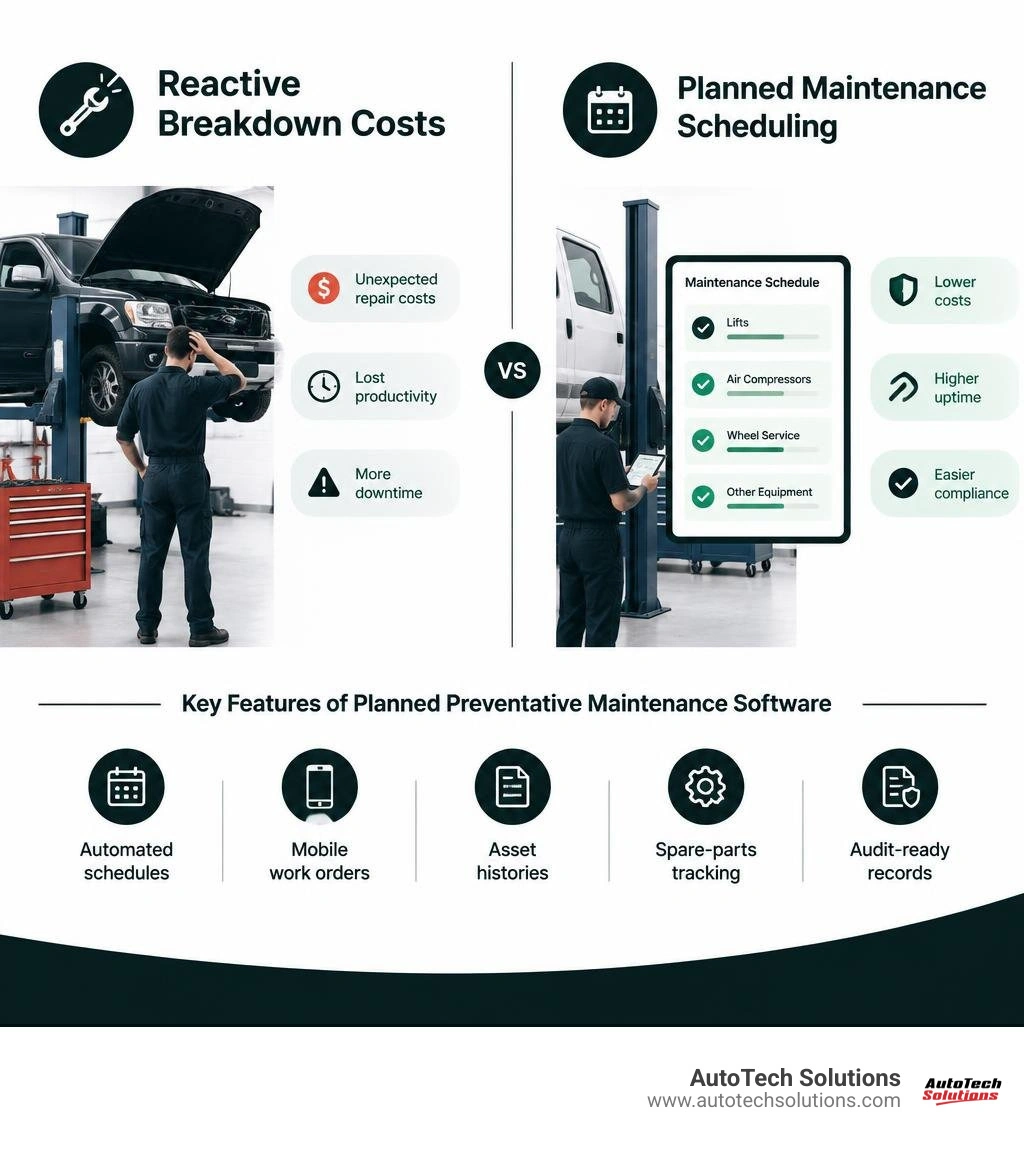
Understanding key facility management concepts helps commercial operations shift from reactive corrective maintenance to advanced predictive maintenance planning and structured preventive maintenance planning and scheduling.
Essential Features of Planned Preventative Maintenance Software
Managing a high-volume commercial automotive shop requires complete visibility into the physical health of your infrastructure. When equipment stops running, service bays grind to a halt, revenue drops, and customer delivery timelines shatter. Implementing comprehensive preventative maintenance systems gives management the structural foundation required to run proactive service operations.
Modern platforms should provide robust asset tracking, multi-location oversight, centralized work queues, parts inventory control, and vendor routing. For commercial shops, the most useful systems also make it easy to standardize inspection templates by asset type, assign ownership for each task, and see which overdue items could affect bay availability or safety compliance.
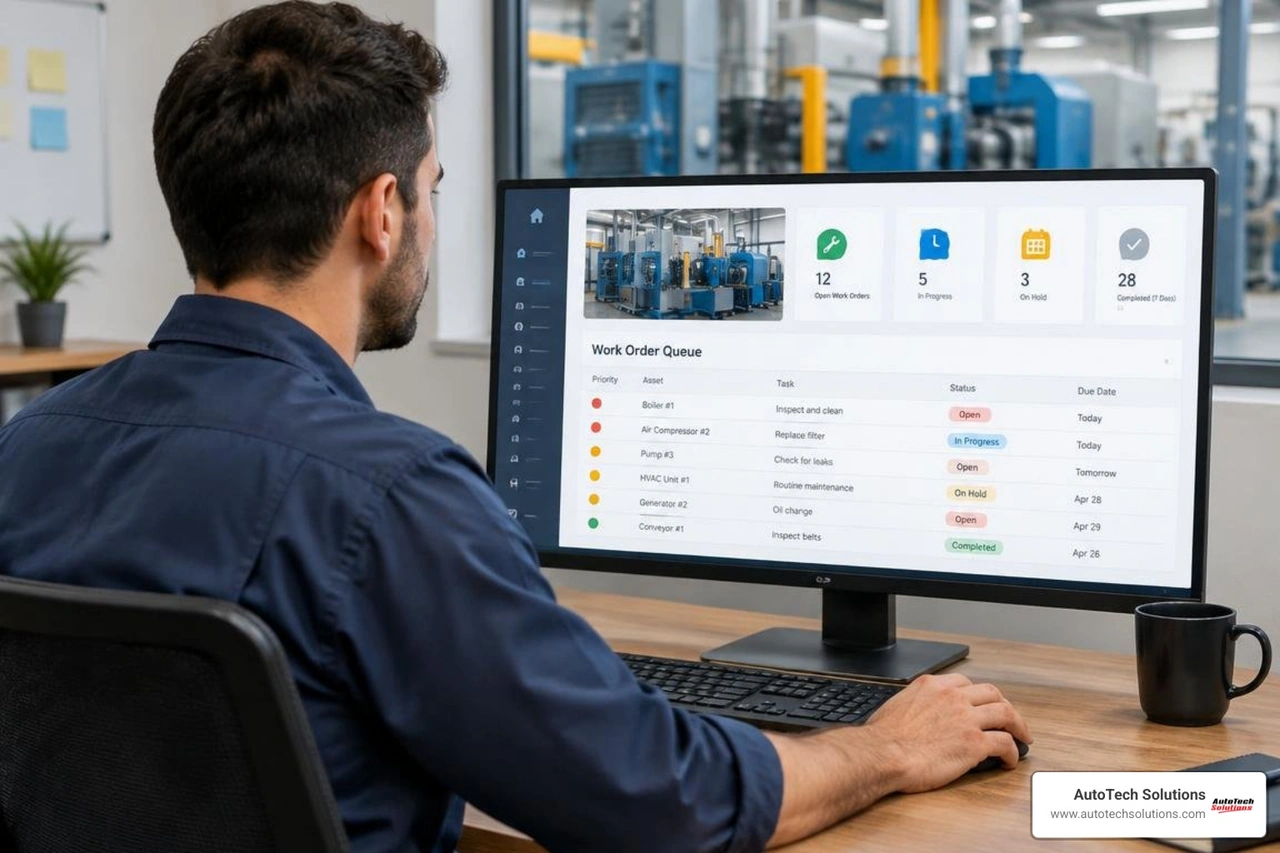
Automating Workflows with Planned Preventative Maintenance Software
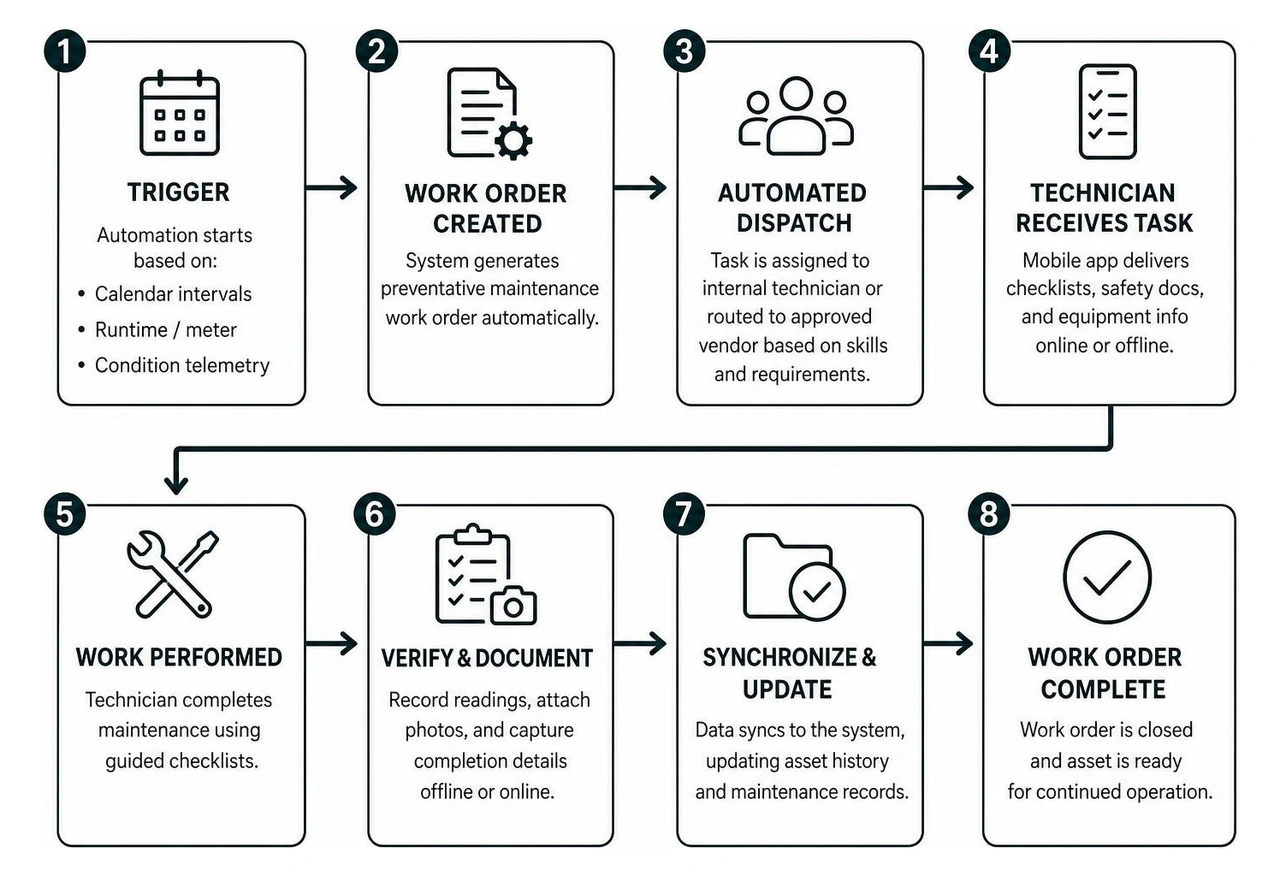
Paper logbooks, desktop spreadsheets, and wall calendars simply cannot scale across modern multi-bay commercial shops. The most effective maintenance platforms replace manual logging with rule-based automations that initiate service based on specific operational parameters:
- Calendar-Based Triggers: Set fixed intervals (weekly, monthly, annually) for mandatory safety walk-throughs, overhead door inspections, or seasonal fluid replacements.
- Runtime and Meter Triggers: Generate automatic work orders based on runtime hours, stroke cycles, or electrical duty cycles, ensuring equipment receives service in direct proportion to real operational wear.
- Condition-Based Telemetry: Connect IoT vibration, pressure, and thermal sensors that automatically open high-priority work orders when operational thresholds deviate from baseline tolerances.
Once triggered, intelligent platforms handle automated dispatch, assigning tasks to certified internal maintenance technicians or routing them to approved service providers based on required skill levels. By pairing these automations with native mobile applications, technicians receive digital checklists, safety documentation, and equipment schematics directly at the machine.
Furthermore, robust offline synchronization guarantees that technicians working in shielded basement mechanical rooms or concrete pump facilities can update checklist items, record measurements, and capture photographic proof of completion without connectivity disruptions. This streamlined maintenance planning and scheduling flow keeps your team focused on productive maintenance rather than administrative data entry.
Inventory Control, Vendor Assignment, and Compliance Tracking
A well-designed maintenance schedule falls apart if the required parts are unavailable when the maintenance window opens. Modern maintenance platforms link planned work order templates directly to MRO (Maintenance, Repair, and Operations) spare parts inventory. When a recurring service ticket is generated, the system reserves necessary filters, seals, fluids, and hardware, reducing stockouts and avoiding expensive rush shipping.
These platforms also streamline third-party vendor management. If an internal team does not handle high-voltage electrical panels, complex shop-level exhaust extraction ductwork, or specialized heavy machinery calibrations, the software automatically routes the dispatch ticket, tracks external response times, and stores contractor service reports in one place.
Crucially, digital tracking establishes audit-ready compliance for regulatory bodies and safety standards, such as ANSI/ALI ALOIM guidelines for commercial automotive lifts. System timestamps, mandatory signature capture, and digital inspection logs verify that every safety latch, hydraulic line, and relief valve undergoes timely inspection. Standardizing routine processes like air compressor preventative maintenance ensures compressed air delivery lines, dryers, and regulators operate safely under constant commercial demand.
Evaluating Software Categories and Deployment Models
Selecting the right maintenance platform requires evaluating how different architectures integrate with existing shop management tools, dealer management systems (DMS), and enterprise resource planning (ERP) suites.
| Platform Category | Core Strengths | Common Drawbacks | Ideal Shop Profile |
|---|---|---|---|
| Cloud-Native SaaS | Instant deployment, seamless mobile app sync, automatic cloud backups, open REST APIs. | Ongoing subscription costs, requires stable internet for real-time reporting. | Multi-location dealership networks, fast-growing commercial collision centers. |
| On-Premise Enterprise | Complete data sovereignty, deep internal network isolation, legacy hardware control. | High upfront IT overhead, manual server patching, cumbersome mobile access. | Large-scale secure facilities with dedicated internal IT infrastructure. |
| Planning-First Solutions | Pre-built equipment interval libraries, rapid onboarding, flat-rate pricing models. | Fewer complex ERP integrations, limited condition-based sensor support. | Independent single-site shops and growing mid-sized automotive service centers. |
For organizations managing shop equipment across multiple locations, open API synchronization can connect equipment health information, operating costs, and asset life cycles with corporate financial systems without manual double-entry. Before committing to an integration, confirm which shop-management, purchasing, accounting, and identity-management tools are supported, whether data flows both directions, and who will own the integration after launch.
Pitfalls of Entry-Level vs. Enterprise Planned Preventative Maintenance Software
While entry-level or free maintenance software may seem attractive for cost-conscious operations, commercial facilities quickly encounter restrictive bottlenecks. Free and budget platforms typically enforce strict asset limits, cap user seats, and restrict repeating work orders to basic time intervals, lacking meter- or runtime-driven automation.
Furthermore, entry-level platforms often truncate historical data after 30 to 90 days. Losing multi-year maintenance histories compromises your ability to track mean time between failures (MTBF), analyze total cost of ownership (TCO), or defend insurance and warranty claims. Industry reviews like the Best Planned Preventive Maintenance Software 2026 roundup highlight that scaling facilities require unrestricted asset tagging, automated inventory deduction, and custom reporting to maintain operational momentum.
Cloud-Based Platforms vs. On-Premise Shop Architecture
Deciding between cloud and on-premise architecture hinges on operational agility and internal IT capabilities:
- Cloud-Based Solutions: Hosted on redundant data centers with 99.99% uptime guarantees, cloud systems eliminate internal server maintenance. Technicians and service directors gain secure access across smartphones, tablets, and web browsers, while software updates, security patches, and regulatory feature enhancements deploy automatically without downtime.
- On-Premise Deployments: While on-premise setups grant complete control over database storage, they demand dedicated local servers, manual database backups, and internal IT administration. For dynamic commercial automotive facilities, on-premise systems can create data silos that restrict field visibility and complicate multi-shop standardization.
Maximizing ROI and Operational Uptime Across Commercial Facilities
Investing in structured maintenance management can create meaningful financial returns by making downtime, labor, and parts consumption visible before problems become emergencies. Rather than relying on broad industry benchmarks alone, commercial facilities should establish a baseline for missed inspections, emergency callouts, delayed repairs, unavailable bays, and recurring parts purchases. That baseline gives service leaders a practical way to measure whether the new process is reducing disruption over time.
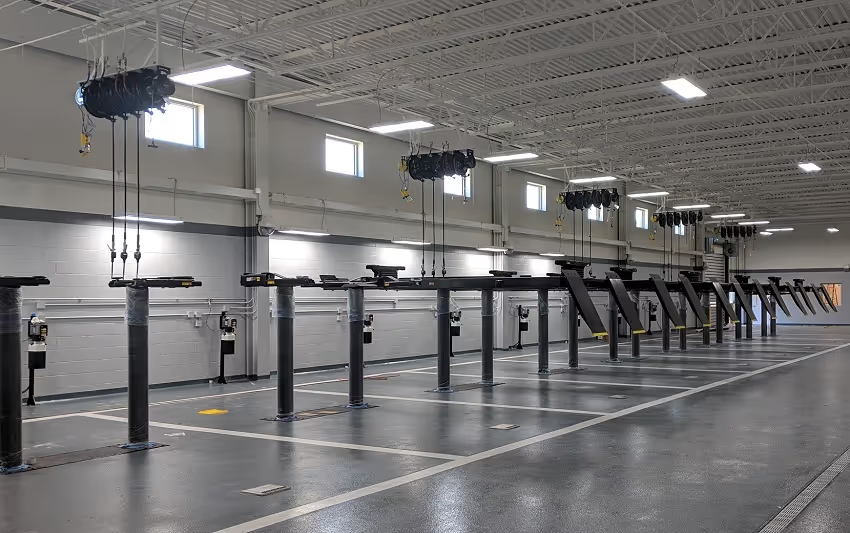
When shop-level infrastructure—such as fluid distribution reels, heavy-duty vehicle lifts, tire balancers, and centralized exhaust extraction systems—operates without interruption, technician wrench time stays focused on revenue-generating customer work. Understanding the true cost of equipment downtime helps leadership quantify how a single failed bay bottleneck can cost thousands of dollars per day in missed billable hours.
Resources like the Shortlist UK's Best Preventive Maintenance Software report demonstrate that tracking KPIs—such as planned maintenance percentage (PMP), mean time to repair (MTTR), and overall equipment effectiveness (OEE)—enables service directors to make data-backed capital replacement decisions rather than guessing asset longevity.
Implementing Planned Preventative Maintenance Software Successfully
Selecting software is only the first step. A successful rollout starts with a clean asset register that identifies every lift, compressor, fluid-delivery system, exhaust extraction component, tire-service machine, and other critical piece of shop infrastructure. For each asset, record the manufacturer, model, serial number, location, installation date, warranty details, safety requirements, and the preferred service interval. Clear records prevent teams from building schedules around incomplete or duplicate equipment data.
Next, convert existing paper checklists, technician knowledge, vendor recommendations, and regulatory requirements into usable work-order templates. Each template should state the task, frequency, required parts and tools, safety precautions, acceptable readings or conditions, photo requirements, and the role responsible for sign-off. Keep the first version practical. Overly long checklists discourage completion, while vague checklists create inconsistent records that are hard to audit later.
A phased launch is often easier to manage than trying to schedule every asset on day one. Start with equipment that has the greatest impact on safe, billable bay operations, such as vehicle lifts, air compressors, fluid systems, and exhaust extraction equipment. Review the first few weeks of work orders with technicians and shop leadership, then adjust task durations, parts lists, trigger points, and assignment rules before expanding to lower-priority assets.
Training should cover more than how to close a ticket. Technicians need to know why accurate readings, photos, and failure notes matter, while managers need a repeatable way to review overdue work, repeat faults, vendor response times, and parts shortages. Assign one internal owner for maintaining templates, asset records, permissions, and reporting so the process remains consistent after the initial rollout.
Finally, use a small set of operational measures to guide continuous improvement. Useful measures include planned-work completion rate, overdue safety inspections, repeat repair frequency, emergency maintenance volume, average time equipment is unavailable, and parts-related delays. Reviewing these measures on a regular schedule helps the facility identify whether the software is supporting better planning or merely documenting the same reactive work.
When comparing vendors, ask for a live walkthrough using the workflows your facility actually needs. Test how the platform creates recurring work orders, records meter readings, attaches photos, manages spare parts, handles offline mobile use, and exports inspection history. A vendor that can demonstrate those tasks with your equipment hierarchy is more likely to support a reliable implementation than one that only presents generic dashboards. Include the maintenance supervisor and a frontline technician in that review, since both perspectives reveal adoption barriers before the rollout process.
Frequently Asked Questions About Preventative Maintenance Platforms
How does planned maintenance software differ from generic CMMS platforms?
Generic CMMS platforms often serve as broad work order repositories designed to capture repairs after equipment breaks down. Planned maintenance software focuses specifically on proactive scheduling engines, automated interval libraries, asset hierarchy mapping, and readiness gating (verifying parts, tools, and labor availability before work begins) to prevent failures before they happen.
How quickly can a commercial automotive facility see ROI from maintenance software?
ROI timing varies with the number of assets, the condition of existing maintenance records, and how consistently technicians use the new process. Early gains often come from fewer emergency contractor calls, less premium freight for rush parts, better control of recurring work, and fewer stalled service bays. Track baseline downtime, completion rates for planned work, repeat repairs, and maintenance spend to evaluate the result for your facility.
Can modern maintenance software integrate with connected shop tools and IoT sensors?
Yes. Contemporary maintenance platforms feature open APIs and native IoT connectors that link to vibration sensors, thermal monitors, runtime hour meters, and digital pressure switches. When operational metrics drift outside normal operating parameters, the software automatically triggers a diagnostic work order.
Conclusion
Deploying dedicated maintenance software transforms chaotic, reactive shop operations into predictable, high-performing facilities. By centralizing automated schedules, tracking spare parts, maintaining compliance histories, and standardizing service across bays, commercial service departments protect their bottom line and maximize technician throughput.
At AutoTech Solutions, we specialize in complete automotive equipment sales, professional car lift installation, emergency field repairs, and professional preventative maintenance programs. Serving commercial facilities across Michigan, North Carolina, and the surrounding regions—with strategic operational hubs in Novi, MI, as well as Charlotte, Raleigh, and Wade, NC—our certified field specialists ensure your heavy-duty shop infrastructure operates at peak reliability. Reach out to our team today to discover how our turnkey maintenance services keep your commercial shop running at total efficiency.