
Introduction
To choose planned maintenance software without losing your mind, start by assessing your asset tracking needs, verifying mobile shop-floor usability, confirming cloud scalability for multi-site growth, and evaluating automated parts and safety integrations. These four criteria will quickly narrow the field before you get lost in feature lists. Keeping a busy commercial service shop running smoothly requires constant attention to machinery. Between rotary vehicle lifts, high-pressure air compressors, heavy-duty tire changers, and dedicated shop exhaust extraction systems, unexpected equipment breakdowns quickly create massive operational bottlenecks. Relying on paper logs or clunky spreadsheets often leads to spreadsheet fatigue, missed inspection dates, and expensive emergency repairs.
Modern operations rely on dedicated digital tools to maintain operational uptime. Industry benchmarks show that organizations standardizing their workflows achieve between 8-20% maintenance cost savings by catching mechanical wear before catastrophic failures happen. In 2026, technology standards make it easier than ever to centralize work orders, standardize asset tracking, and protect commercial profit margins across all your service bays.
What Is Planned Maintenance Software and Why Does It Matter?
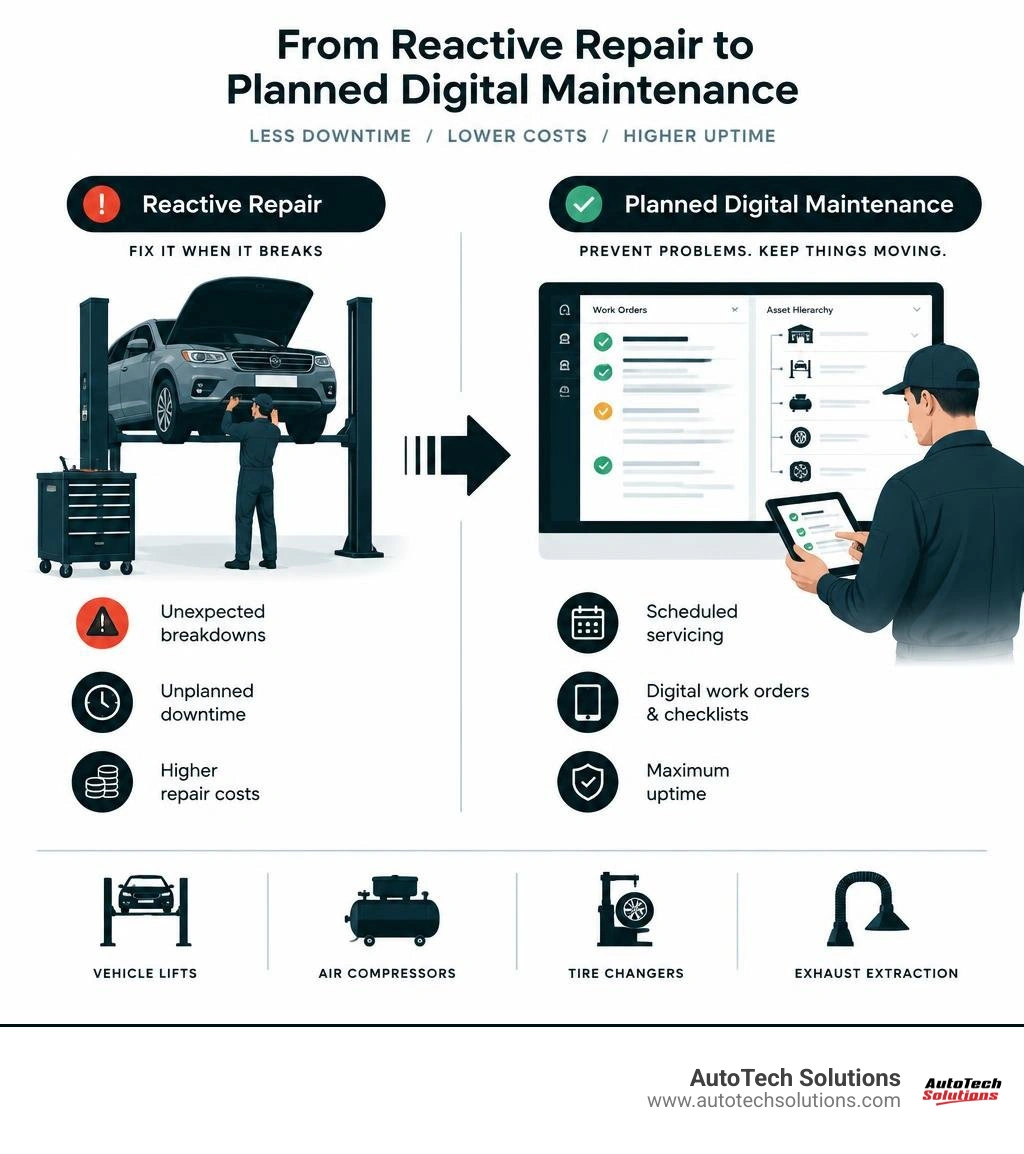
Planned maintenance software is a centralized digital management system designed to schedule, track, and document all inspection, servicing, and repair activities across commercial machinery. Instead of waiting for a critical piece of shop equipment to seize up mid-shift, this software organizes recurring servicing based on calendar intervals, runtime hours, or operational cycles.
By centralizing digital work orders and machinery histories, service directors eliminate administrative chaos. Technicians access specific servicing checklists right from their mobile tablets or rugged shop terminals, reducing administrative lag and delivering up to 70% less mean time to repair. Furthermore, moving away from crisis-driven repairs helps commercial operations avoid the steep cost of downtime in dealership service departments, where a single stalled bay can eliminate thousands of dollars in billable labor each day.
Establishing structured routines can lead to up to 53% lower maintenance costs overall. According to the Operations & Maintenance Best Practices Guide: Release 3.0 published by the Federal Energy Management Program, institutionalizing scheduled servicing ensures baseline operational readiness, avoids premature capital replacements, and keeps infrastructure running at peak energy efficiency.
Comparing Planned Maintenance Software to Preventive and Predictive Systems
While people often use these terms interchangeably, maintenance management strategies represent different levels of operational sophistication:
- Planned Maintenance: Any maintenance activity that is scheduled, resourced, and documented in advance. This includes recurring calendar checks, scheduled overhauls, and planned shutdowns.
- Preventative Maintenance: A subset of planned maintenance focused on time-based scheduling, running hours, or cycle usage thresholds (such as servicing a compressor every 500 operating hours or inspecting lifting cables monthly), as outlined in our preventative maintenance systems guide.
- Predictive Maintenance: An advanced condition monitoring approach that uses sensor telemetry (vibration, heat, acoustics, and pressure) to trigger work orders right before a component fails.
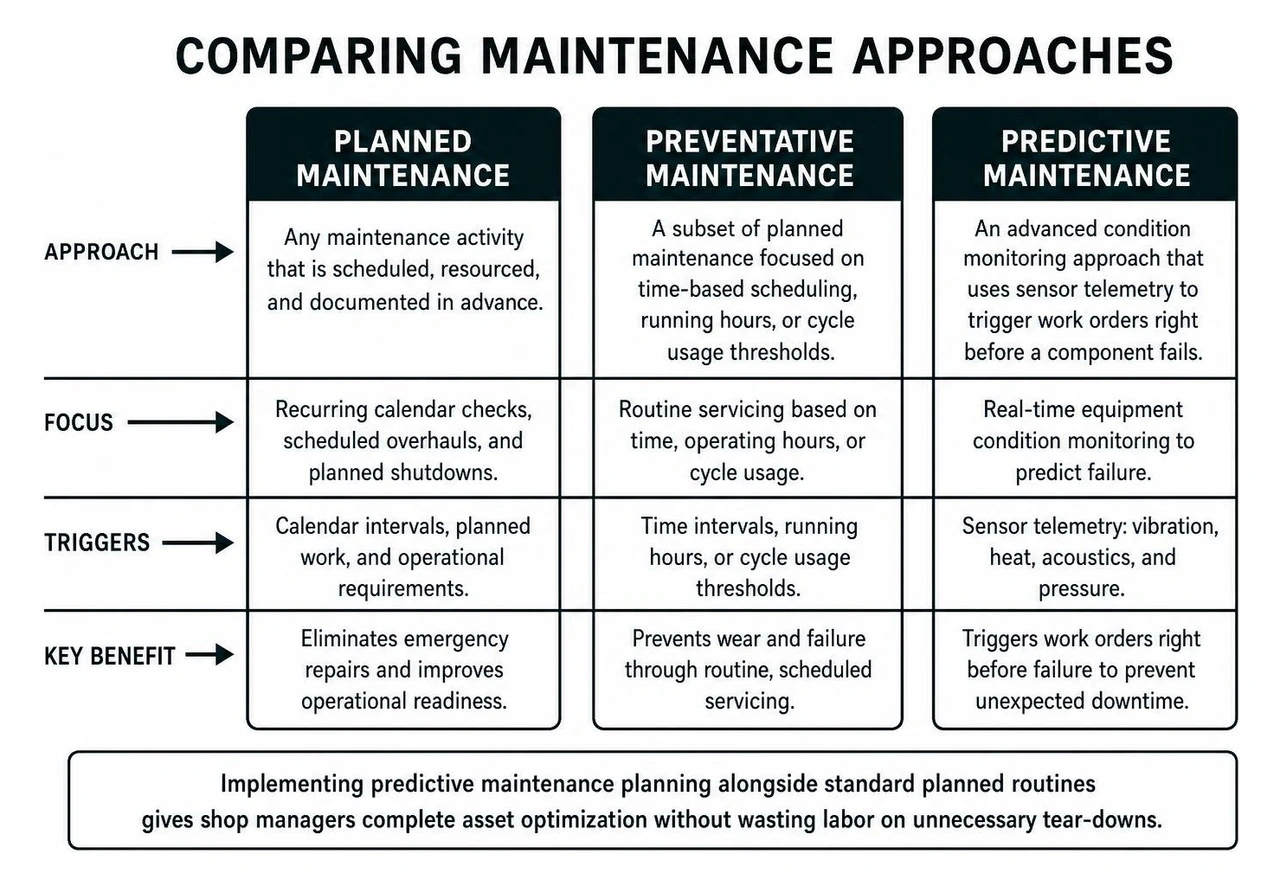
Implementing predictive maintenance planning alongside standard planned routines gives shop managers complete asset optimization without wasting labor on unnecessary tear-downs.
The Financial Impact on Downtime and Equipment Lifecycles
The primary goal of planned servicing is eliminating emergency repairs. When an overhead fluid delivery system or commercial alignment rack breaks down unexpectedly, you lose revenue, idle your certified technicians, and disrupt customer scheduling.
Understanding how to reduce shop equipment downtime begins with tracking every maintenance event. Capturing ongoing service metrics yields at least $3,000 in annual reactive maintenance savings per piece of heavy machinery by catching minor mechanical defects early. Proactive servicing directly supports comprehensive equipment lifecycle management for automotive facilities, lowering the total cost of ownership by adding years of dependable service to heavy-duty capital equipment.
Essential Features to Look for in Modern Maintenance Platforms
Selecting software for a commercial automotive shop requires looking beyond generic to-do lists. Commercial facilities manage complex infrastructure that demands purpose-built capabilities.
When vetting software platforms, look for:
- Hierarchical Asset Structuring: Organize equipment by physical facility, specific service bay, equipment type, and sub-assemblies.
- Automated Work Order Triggers: Generate tasks automatically based on run-hours, sensor data, or preset calendar milestones.
- Mobile Execution and Checklists: Technicians should be able to scan QR codes attached to machinery, open digital checklists, upload inspection photos, and complete work orders directly on the shop floor.
- Standardized Inspection Templates: Use pre-built templates for safety compliance, aligning with standard preventative maintenance lift inspections.
AI Automation and Actionable Frontline Intelligence
Modern maintenance systems utilize artificial intelligence to speed up administrative workflows and turn frontline data into operational insights. Modern platforms process over 10B+ data points weekly to identify performance anomalies across industrial machinery.
Key AI capabilities include:
- Natural Language Queries: Shop managers can type questions in plain English (such as "Show me all air compressors with rising motor temperatures over the last 30 days") and instantly receive tailored reports without manual data filtering.
- Automated Summary Generation: Convert complex technician notes and repair histories into concise hand-off reports for shift supervisors.
- Automated Approvals: Machine intelligence can automatically reconcile parts invoices and completed work orders, with leading systems achieving up to 90% invoices approved automatically.
- Comprehensive Analytics: Access 100+ standard reports analyzing mean time between failures (MTBF), technician labor efficiency, and recurring part failure rates.
Parts Inventory, Procurement, and Safety Integration
Maintenance schedules are useless if you do not have the required filters, hydraulic fluids, seals, or belts in stock when a service window opens. Modern platforms integrate spare parts inventory directly with scheduled maintenance routines.
When a 500-hour service work order is automatically scheduled, the platform checks your local stockroom for required replacement parts. If inventory falls below predefined safety thresholds, the software generates automated purchase requisitions.
Furthermore, shop safety workflows integrate seamlessly into digital maintenance tasks. Technicians complete mandatory lockout/tagout checklists, verify permit-to-work parameters, and record physical safety lock engagements before marking a piece of heavy shop infrastructure back in service, establishing an unshakeable safety audit trail.
Cloud-Based vs. On-Premise Planned Maintenance Architecture
Choosing the underlying deployment architecture determines how quickly your team can get started and how easily your system scales across multiple facilities.
| Evaluation Metric | Cloud-Based (SaaS) Solutions | On-Premise Enterprise Solutions |
|---|---|---|
| Deployment Speed | Rapid multi-site rollout; full deployment in days to weeks. | Requires dedicated servers, IT infrastructure, and months of setup. |
| Scalability | Add new bays, facilities, or users instantly via cloud subscriptions. | Requires ongoing hardware purchases, local network expansions, and server upgrades. |
| Offline Capability | Native mobile caching syncs data automatically when connections restore. | Requires local network connectivity; limited field synchronization outside the shop. |
| Data Security & Backups | Managed by vendor with SOC2, ISO 27001, and automatic redundancy. | Managed entirely by internal IT staff; manual backup and disaster recovery plans. |
| Total Cost of Ownership | Predictable operating expense (OpEx); all updates and support included. | High initial capital expenditure (CapEx) for licenses, servers, and ongoing IT labor. |
For operations scaling across multiple commercial sites, cloud-based architectures provide unmatched agility. High-performing multi-facility enterprises have successfully deployed cloud maintenance solutions across 200 sites implemented in 9 weeks without burdening internal IT departments.
How to Evaluate Software Options for Multi-Site and Commercial Operations
Operating multiple service facilities—whether across Charlotte, NC, Raleigh, NC, Wade, NC, or Novi, MI—presents distinct management challenges. Central corporate leaders need enterprise-level visibility into asset health, while shop foremen need streamlined daily schedules that do not distract technicians from productive wrench time.
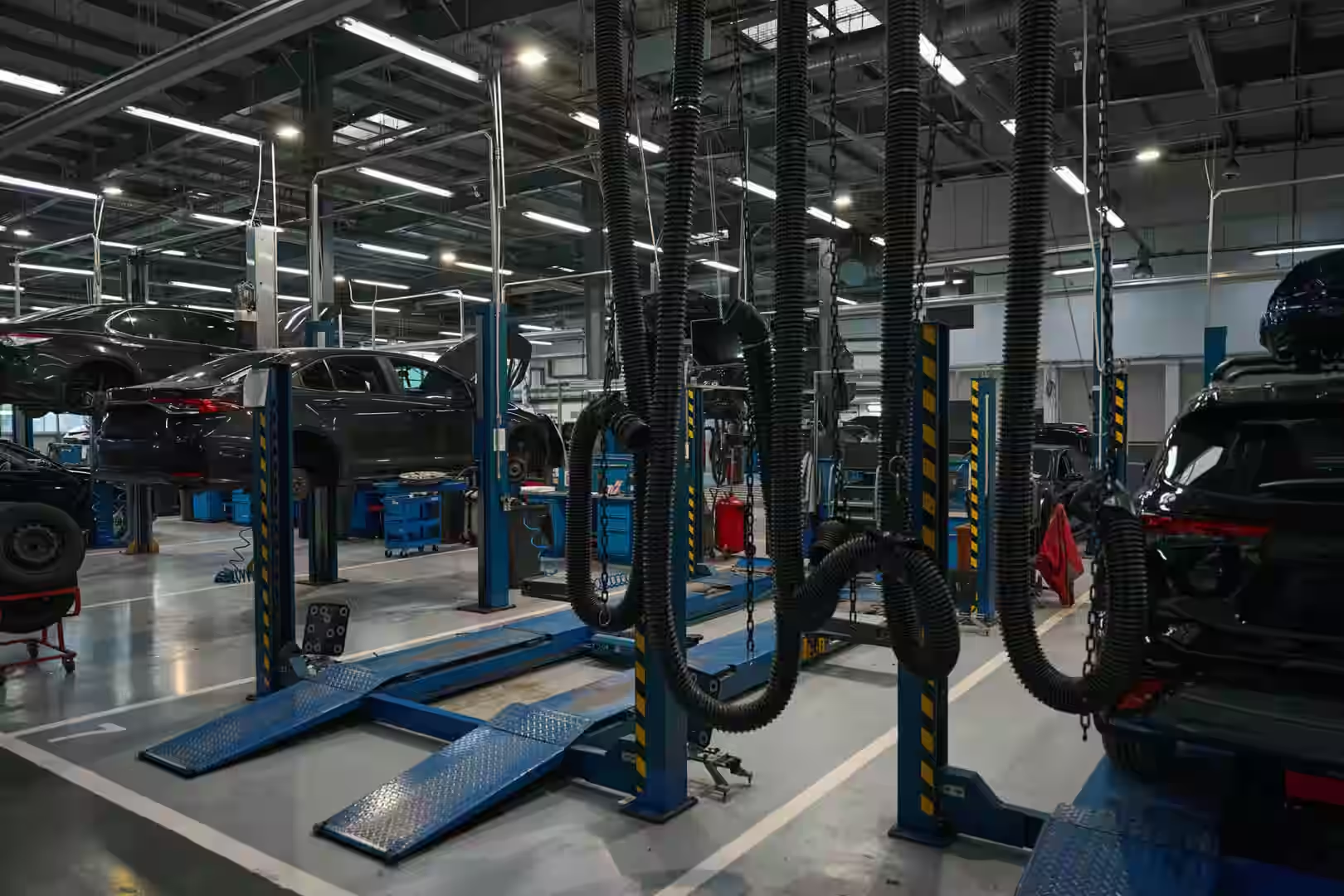
Enterprise organizations operating 40+ plants standardized maintenance across their entire footprint by establishing uniform inspection checklists, universal spare part taxonomies, and centralized dashboard reporting. When managing shop equipment maintenance across multiple locations, align your operational workflows before finalizing your software platform.
The Limitations of Entry-Level and Free Planned Maintenance Software
Small shops are often tempted by free or entry-level software tools. While freemium tools can work for logging basic tasks on a handful of machines, they quickly become an operational roadblock for commercial facilities:
- User and Asset Caps: Free tiers typically restrict you to 1 or 2 users and fewer than 25 active assets, making it impossible to map out a complete commercial shop floor.
- Recurring Automation Restrictions: Many entry-level plans cap recurring work orders at 2 to 5 tasks, forcing managers back into manual scheduling routines.
- Historical Data Constraints: Entry-level tools frequently limit historical records to 7 or 30 days, wiping out the audit trail required for regulatory compliance and insurance verifications.
- Field Usability Hurdles: Freemium platforms frequently strip out mobile photo uploads, offline caching, and barcode scanning from their entry tiers, leading to poor adoption among frontline technicians.
Specialized Commercial Demands: Automotive Facilities and Heavy Equipment
Commercial automotive service facilities manage specialized shop infrastructure with unique maintenance demands:
- Heavy-Duty Commercial Lifts: In-ground, two-post, four-post, and scissor lifts require strict monthly cable tensioning, hydraulic cylinder leak checks, anchor bolt torque checks, and annual structural safety certifications.
- Rotary Screw Air Compressors: Demands daily moisture drain checks, weekly oil level verification, filter changes, and desiccant dryer monitoring to protect downstream air-operated equipment.
- Wheel Service & Alignment Equipment: Requires precision optical calibration, software updates, and turntable mechanical inspections to maintain pinpoint accuracy.
- Exhaust Extraction Systems: Demands motor lubrication, duct airflow verification, and flexible hose integrity checks to ensure OSHA compliance for indoor air quality.
Because critical equipment failure halts bay revenue, your software must link directly to a clear breakdown response plan for critical shop equipment so your team can dispatch certified field technicians instantly when unexpected issues arise.
Implementation and Migration Roadmap: Moving Beyond Spreadsheets
Switching from legacy paper binders or spreadsheets to a modern maintenance platform requires a structured rollout plan. Follow this practical, step-by-step roadmap for a smooth transition:
- Audit and Catalog Shop Infrastructure: Create an inventory of every major piece of shop equipment across all bays, noting serial numbers, installation dates, model numbers, and physical locations.
- Standardize Task Checklists: Gather manufacturer servicing manuals and consolidate recurring inspection tasks into standardized digital checklists.
- Data Mapping and Template Import: Format your asset registry and historical data into structured CSV templates to perform clean batch imports into the software.
- Configure Thresholds and Recurring Schedules: Establish runtime hour intervals, calendar triggers, and low-inventory reorder points for critical wear items.
- Frontline Technician Onboarding: Conduct hands-on mobile training sessions with shop technicians, demonstrating how to open, document, and close out digital work orders.
- Establish Executive Reporting Dashboards: Set up custom automated metrics to streamline equipment maintenance reporting for dealer groups.
Frequently Asked Questions About Planned Maintenance Software
How does planned maintenance software ensure compliance during safety audits?
Planned maintenance software creates an immutable, timestamped digital record for every inspection, adjustment, and repair completed on shop machinery. When regulatory agencies or insurance underwriters inspect your facility, you can generate comprehensive compliance reports in seconds. These records prove that equipment like commercial lifts, fluid delivery lines, and shop ventilation systems have been inspected and maintained according to OSHA, ANSI/ALI ALCTV, and manufacturer guidelines.
Can planned maintenance platforms function without continuous internet connectivity?
Yes, modern platforms utilize offline mobile data caching. Technicians working in concrete bays, basements, or remote fleet yards can access assigned work orders, record equipment measurements, complete safety checklists, and snap inspection photos without an active internet connection. As soon as the mobile device reconnects to Wi-Fi or cellular service, all stored data synchronizes automatically with the central server.
What is the typical timeframe for rolling out a planned maintenance platform across multiple facilities?
A standard multi-site rollout for commercial automotive shops typically takes between 4 to 9 weeks. By utilizing structured data import templates for asset inventories and manufacturer-recommended maintenance schedules, enterprise systems process 11M+ work orders annually without operational disruption during the migration phase.
Conclusion
Choosing the right maintenance software transforms how your commercial shop operates. Shifting from reactive emergency repairs to proactive equipment management protects your shop's daily revenue, extends the lifespan of expensive capital assets, and keeps your service bays running at peak capacity.
At AutoTech Solutions, we specialize in helping commercial facilities, dealership groups, and fleet shops maintain maximum uptime with professional automotive equipment sales, expert installation, and reliable ongoing support. Explore our comprehensive preventative maintenance programs to keep your shop infrastructure operating safely and profitably day after day.